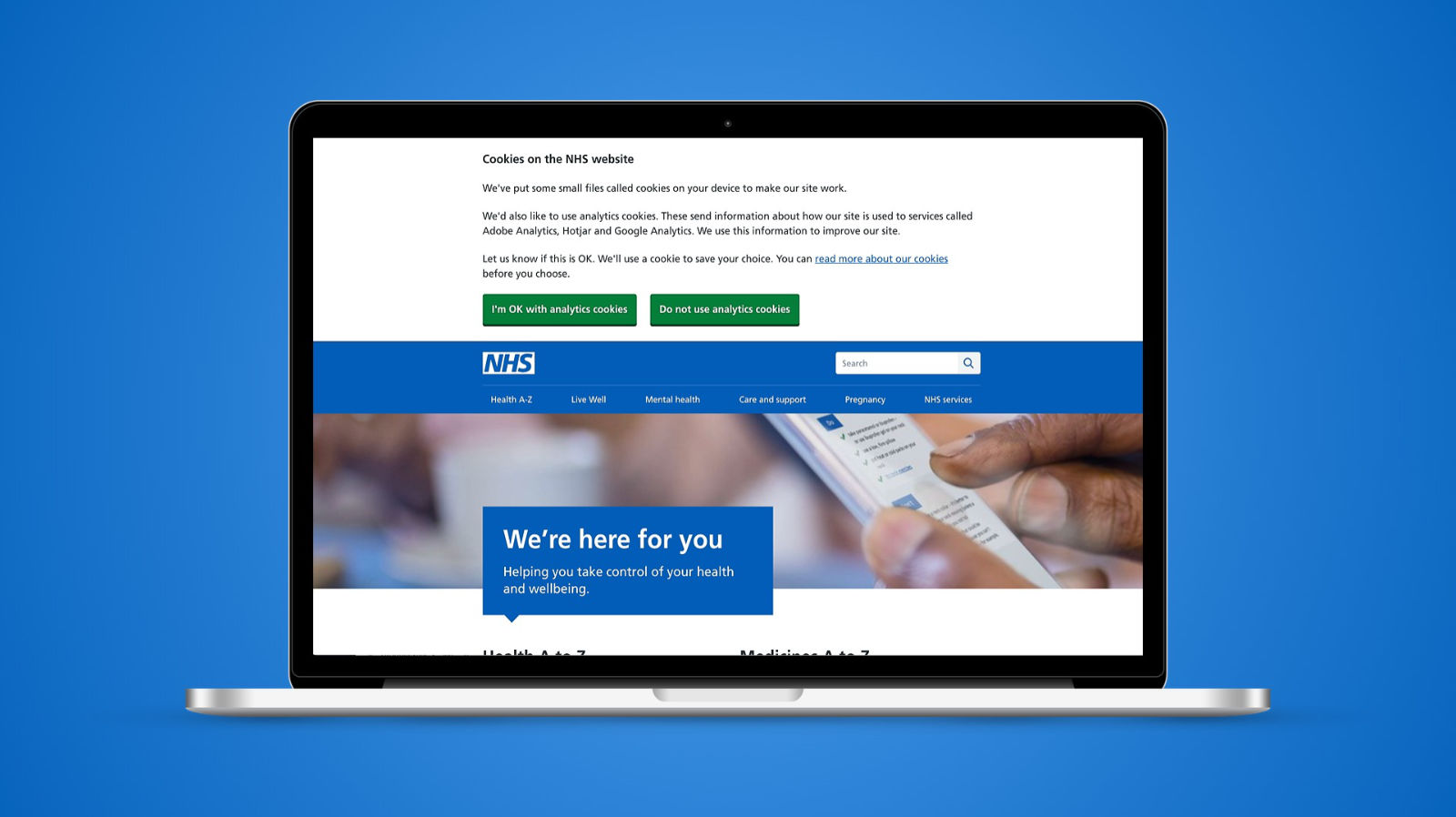
Nobody visits the NHS website to think about cookies. They come because they're worried about a symptom, a child, a parent. My job was to ask them a question they didn't want to be asked, in a way that was honest, quick to answer and worked for everyone.
At a glance
- Organisation: NHS Digital, the NHS website (nhs.uk)
- My role: Senior Interaction Designer
- When: 2018 to 2019
- Working with: product, information assurance, content design, front end developers and an external accessibility audit by the Digital Accessibility Centre (DAC)
The problem
In 2018 GDPR and the privacy regulations that sit alongside it changed what websites had to tell people about cookies. The NHS website had a cookies policy page, but no way of asking visitors what they were happy with.
We wanted to go further than the legal minimum. The NHS website is one of the most visited sites in the country, and we felt it should be an exemplar in explaining privacy to people plainly, rather than burying it in a policy nobody reads.
At the same time, analytics mattered. The site is paid for with public money, and usage data is how the programme shows that it's improving health outcomes and worth that money. If a badly designed banner made most people switch analytics off, we'd be flying blind.
What I did
The team had agreed to use a third party consent tool to manage the cookies themselves. My work was everything the visitor actually saw:
- The banner. A short, plain explanation of what cookies we set and why, with a clear choice. No dark patterns, no pre-selected answers hidden behind "settings".
- The "manage your cookies" page. Where people could see the types of cookie we use and change their mind later.
- The words. I rewrote the cookie descriptions the tool generated, so instead of "Statistics" a visitor reads "These cookies store information about how you use our website", and instead of "Necessary" they read "These cookies do things like keep the website secure. They always need to be on."
I built the designs as a working prototype using the NHS front end library, so the team could test real markup rather than pictures of markup.
Testing it with disabled people
Before anything shipped, DAC audited the prototype with their team of disabled testers using JAWS, NVDA, VoiceOver, TalkBack, Dragon, screen magnification and keyboard only.
They found four high priority issues on the cookie settings page and I'm glad they did. A fieldset was missing its legend, a stray heading tag made every checkbox announce as a heading to screen reader users, and the focus indicator was a fraction under the 3:1 contrast ratio. The one that stuck with me was error handling: a screen reader user who made a mistake wasn't told, and had to re-read the page to find out what had gone wrong.
Every issue was fixed before launch, and a few of them fed back into the NHS design system so other teams wouldn't make the same mistakes.
What shipped
The banner that went live asks one question, with two buttons of equal weight: "I'm OK with analytics cookies" and "Do not use analytics cookies". Choosing either dismisses it, and the choice is remembered. There's a link to read more before you decide, but you don't have to.
It's a small piece of a huge website, and that's rather the point. The best thing a cookie banner can do is get out of the way, honestly.
What I learned
Plain English is an accessibility feature. The biggest improvements on this project weren't in the code, they were in replacing words like "statistics" and "necessary" with sentences a worried person can read in two seconds.